Platewell: a household recipe manager
Platewell is a recipe keeper for the whole household. Families keep their recipes in one place, plan the week’s meals together, and can pull up a recipe in the kitchen even when the wifi is flaky or out. Deeply Development designed, built, and operates Platewell, from the native apps and recipe imports to the sync engine.
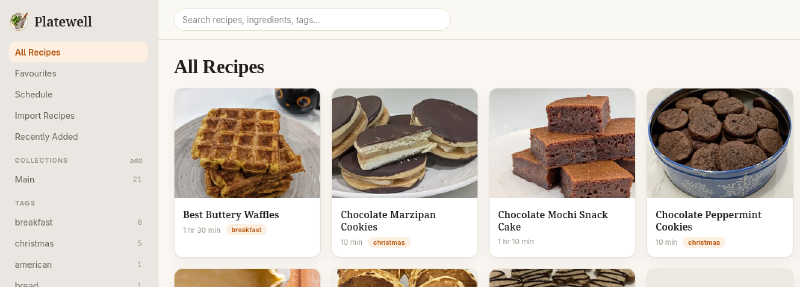
At a glance
- Platforms: native iOS and Android apps, plus a full web app
- Architecture: offline-first, with on-device storage, on-device search, and background sync
- Collaboration: one shared household library where everybody can see all the recipes and the cooking schedule
- AI import: recipes pulled from photos, text files, Word documents, PDFs, web pages and more
The problem
Family recipes end up scattered across notes apps, screenshots, bookmarks, cookbooks, and recipe cards. Nobody can find the one they need, only one person can edit each copy, and phones in a kitchen often have a poor connection.
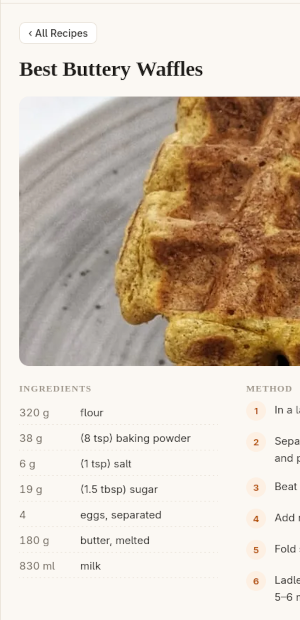
Platewell turns those scattered recipes into structured data: searchable by ingredient or tag, organized into collections, synced to everyone’s devices, and editable by the whole household.
What we built
Sync without conflicts
Two people editing the same recipe on two phones at the same time both keep their changes. Nobody sees a conflict dialog or has to choose which version to throw away. Deletes are soft, so a delete that races an edit sends the recipe to the trash with the edit included.
Collections, tags, recipes, and the meal plan are shared with every member of the household. Favourites stay personal and sync only to that person’s own devices. Owners and editors can change recipes. Viewers can browse everything and still keep favourites.
Works fully offline
Recipes live on each device, not only on a server. Every edit is saved on the device first, so the app never waits on the network to show your own work. Browsing, searching, editing, meal planning, and importing from files all work with no connection, and changes sync when one comes back.
- Search runs on the device. Results appear as you type, with relevance ranking, title boosting, prefix matching, and typo tolerance. Search covers titles, descriptions, ingredients, steps, tags, notes, and the recipe’s source.
- Photos are attached before they upload. A photo attaches to its recipe as soon as it’s taken, and the upload waits in a queue until the device is back online.
- The app degrades gracefully. When the app can’t save changes, the whole library and meal schedule can still be read. Revision history is the only feature that needs a connection.
Dynamic recipe import
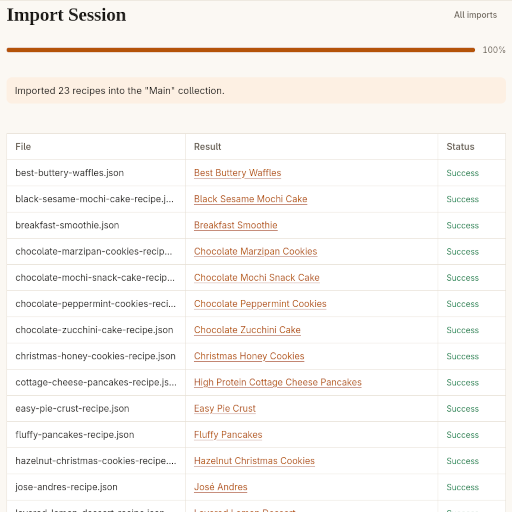
Nobody wants to retype a recipe collection. Platewell reads recipes from photos of cookbook pages, PDFs, Word and OpenDocument files, text and Markdown files, saved web pages, schema.org JSON, and recipe URLs. It pulls out the ingredients, steps, and tags, and saves each recipe to the collection chosen for imports.
- Bulk import on the web: import many files at once. On mobile, recipes can be imported from the camera or a URL.
- Resumable sessions: you can close the tab partway through, and the session and each file’s status are still there when you come back.
- Duplicate detection: incoming recipes are compared with the library on title, ingredients, and instructions. Close matches are flagged and skipped, with a Force Import option to add them anyway.
- Metadata comes too: images from the source become recipe photos, and schema.org keywords, categories, and cuisines become tags.
A shared meal schedule
The schedule is the household’s meal plan: recipes placed on calendar days and shared with everyone. It has a month grid and a week-by-week list. On the web both views appear together; on mobile you switch between them, and the list scrolls in both directions. Planning a meal and marking a recipe as cooked update the same cook date, so the plan and the recipe history always match.
Everything else that makes a large library usable
- Collections act like shared recipe books, and a recipe can appear in more than one.
- Tags are cleaned up when saved: extra spaces removed, empty tags dropped, and duplicates merged regardless of capitalization. Each household chooses how tags are displayed.
- Favourites are each person’s own shortcut list.
- Sharing creates an expiring link to a recipe or collection. Anyone can open it without an account and save a copy into their own household.
- Keyboard shortcuts on the web cover search, moving between results, and navigating the schedule. Every shortcut also has a visible button, and shortcuts are ignored while you’re typing in a field.
- Revision history shows what changed on a recipe and lets you restore an earlier version.
The result
The public Platewell site is live at platewell.net, with apps for iOS, Android, and the web. It shows the kind of work we do for clients: understand the real problem, design an architecture that holds up in the real world, and ship polished software on every platform the customer uses.
Have a product idea like this?
We can help you plan it, build it, and ship it across web and mobile.
Talk to us